
Many applications require MySQL as a database.
Installing it requires just a few steps.
First update the system using
sudo apt-get updateContinue reading

Many applications require MySQL as a database.
Installing it requires just a few steps.
First update the system using
sudo apt-get updateContinue reading

For whatever reason, the default editor to change sudo permissions, which pops up when visudo is entered, is set to nano. I don’t have a clue why an option can’t be given on first use to change the editor.
The way to change it is to run the update-alternatives command
$> sudo update-alternatives --config editor
Which gives us these options.
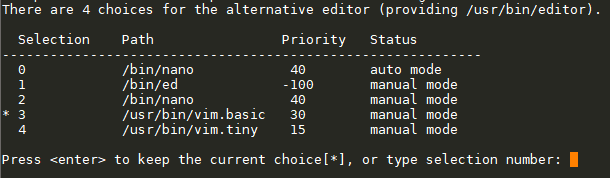
Select 3 for vim.basic and we’re back to sanity.

rvm or the Ruby Version Manager, works perfectly fine when there is a single version of Ruby to be run on the system (among multiple versions installed, of course) around the entire system. In a production scenario, updating ruby itself is a task which is not taken lightly!
This worked perfectly until I encountered two quite different situations –
One scenario was where I wanted to execute a command via ssh into the server. So something like –
ssh user1@server1 'ruby ~/program.rb'
The other being when I wanted to run a ruby program via cron
In both these cases, I kept getting the error rvm not found. Initially, I couldn’t understand this at all, because every time I logged in and ran the program or the command it would run prefectly.
And then I learnt about the difference between a login and a non-login shell.
Continue readingWhen I’m setting up a linux system, since it’s not very often, I have to keep looking up the basic commands for user setup.
I had started putting them in a text file and now it’s reached here!
Continue readingBy default when crontab-e is run for the first time, we get the choice to set the editor.
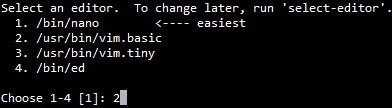
The selected editor is stored in a file ~/.selected_editor
However, if the selected editor needs to be changed later, the command is –
select-editor
To reset or unset the selected-editor completely, we can remove the ~/.selected_editor file completely.
Ref: https://www.howtogeek.com/410995/how-to-change-the-default-crontab-editor/
This was the output of the first program that which I wrote in C. Before that, programs were about mathematical acrobatics.
It didn’t even strike me when I wrote the program. But then when I compiled it and ran it and I saw that ‘Hello, World!’ blinking on the screen I suddenly felt a vast expanse.
Suddenly, I was part of another world. A world out there, where people actually do useful things with computers. A world of learning.
And I’ve been programming ever since. And the first program I write whenever I learn a new language outputs this same line. Just so that I never forget that I’m just another programmer on a journey as so many others all over.
Copyright © 2026 the möbius trip
Theme by Anders Noren — Up ↑